Subscribe:

Monday, 3 December 2012

Computer Type: Tablet PC


Some details about the tablet: the concept of the device, device control using the stylus, finger, mouse and keyboard. The main advantages and disadvantages.

Tablet PC (in other words, tablet PC) is a full-size laptop, belonging to the class of PC (personal computer) and equipped with a touch screen. Permits to work fingertips or a stylus, using the keyboard and mouse, as well as without.

If we compare the tablet PC to laptops, they offer the following advantages and disadvantages:


Advantages

• If equipped with a stylus rather convenient for design

• Applying the vertical orientation of the display, it is convenient to perform the reading of electronic books.

• The Tablet PC is convenient for work, folded on the table position, since the line of sight is not interrupted (for example, at a business meeting).

• Especially convenient tablet PC for reviewing documentation, allowing the pen to make notes directly in the text or in the fields.

Limitations

• Less secure fit the screen as it is carried by only one rotary loop (typical laptop screen is held on 2 loops). This shortage is not a tablet PC or HP/TC1100 Fujitsu-Siemens Stylistic, capable of operating without the keyboard, or do not have it at all, respectively.

• Special pressure sensitivity screen coating reduces rates of brightness and viewing angle.

• Tablet computers for about 300 $ more expensive than regular laptops, similar in characteristics, but they believe that the difference in time should drop to $ 75.

• Usually very low precision pressing fingertips (but in models of some manufacturers put a touch-panel high quality, where such lack almost observed).

What is in Your Computer? (Computer Hardware)


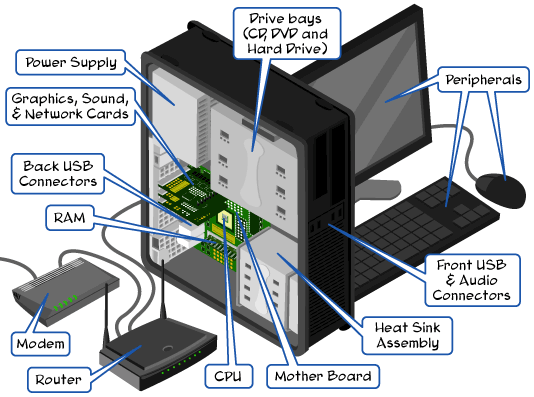
Major and minor Components of a PC: Case, CPU, Hard Disk, Motherboard, Video Card, Power Supply, Monitor or LCD, Keyboard, etc.

If you look at the PC from the outside, you can see the monitor, system unit, keyboard, and mouse, but if you look inside the system case, then there will find all the basic "stuffing."


Housing: It Shelf. Is the main computer unit, which houses all the major components?

Processor: the base or "brain" of the computer, to process data and any mathematical operations. Now mainly used Processor Company Intel and AMD. From each other are distinguished two main parameters: the model and clock speed.

The Motherboard: is a piece chassis. To it are connected all the main elements: a processor with cooler, hard drive, video card, memory.

The Cooler: is needed to cool the highly basking processor. Now coolers are: an aluminum or copper base, combined (based on copper plates with aluminum) and heat pipes.

Video Card: transmits images to a monitor and does share calculations concerning the preparation of images for display on a monitor. It has a built-in memory and is equipped with its own processor cooler. The image quality depends on the video card.

A very important element of a Computer Memory. It is different, and the processor speed when reading data from the memory not wait. Thus, the speed of your computer depends on the speed and amount of RAM.

HDD (Hard Disk Drive): is used to record and store information on it about the operating system used by the program, recorded games, music, movies, photos, etc. differ HDD's capacity (volume of information can fit on them), speed and types of connection to the motherboard (SATA, IDE, USB).

The Power Supply: is used to supply power to all components of computer system unit. Power supplies vary power: the power of them, the more items the "stuffing" of the computer can be connected.

Consider secondary or auxiliary components of the computer.

Monitor or LCD: (display) a device for displaying graphics and video. Most popular - CRT and LCD monitors. CRT monitors for cathode-ray tubes are now obsolete. Liquid crystal displays (LCD) everywhere they are replaced. Choosing an LCD monitor depends on the purpose of use of the computer (for games, video editing, office applications, graphics, photo processing). LCD monitors have different technical features and parameters.

Keyboard and Mouse: input device for controlling a computer via special keys and buttons.

Speaker System: speakers, responsible for sound output information. Eton, in fact, is the most common basic set of computer.

Related Posts Plugin for WordPress, Blogger...