


Showing posts with label Computer. Show all posts
Showing posts with label Computer. Show all posts
Tuesday, 4 December 2012

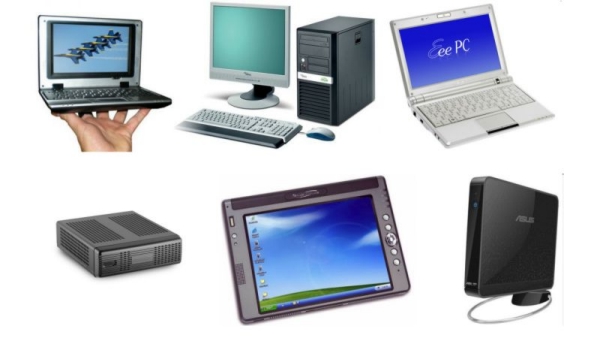


A little bit
about what a nettop: the concept of the nettop, its dimensions and the possible
installation methods. The main advantages and disadvantages of nettop.

These devices are system blocks having
dimensions slightly larger than a normal book. They are mainly mounted
vertically, but you can mount them on the wall or the back of the monitor.

Advantages
1. Compact size.
2. Ability to select the monitor
yourself.
3. Low noise and low power consumption.
4. New models have a performance for
video Full HD.

Limitations
1. Not mobile.
2. Reduced the maximum attainable level
of performance (due to their compact design.)
3. More expensive than desktops with
similar parameters.

Briefly about
what is a notebook: identification and mobility issues. The main advantages and
disadvantages of laptops (notebooks).

Laptop computer brings together all
the necessary housing for the components, including the monitor. Is, therefore,
a mobile device, but the degree of mobility can vary. Thus, the diagonal of the
display varies from 13-17 inches, and a corresponding effect on the weight and
size.

Advantages
1. Mobile devices. It is better to use a
special carrying bag.
2. High performance, very large monitor.
3. The cost is commensurate with the
price of a set of monitor plus desktop.
Limitations
1. Restriction on the upper limit of
performance.
2. Restriction on the maximum size of
the display. You can, of course, connect and external monitor, although the
extra cost.
3. Productive model, as a rule, have a
decent weight and long battery-powered.

Principal of a compact laptop
(netbook): the concept of a netbook, and the diagonal size, performance,
advantages and disadvantages of devices.
Is, in fact, decreased in all senses
of the laptop version. Displays Netbooks generally have a diagonal of 10.7
inches. In addition, the used components with low power consumption (and,
usually resulting in poor performance.)

Advantages
1. Compact size (almost similar to A5),
which is convenient to carry.
2. The long period of battery life
(there are models that can operate up to 8 hours).

3. Performance enough to work with
office applications and browsing movies.

Limitations
1. The keyboard is not convenient (due
to the small size of the device).
2. Productivity is low.

Main that is desktop: the concept of
the desktop, its basic design, functional, aesthetic and economic advantages
and disadvantages.
Is a common system unit with you to connect
a Monitor, Keyboard, Mouse and Speakers. Today is probably the most popular
option.

Advantages
1. It is possible to apply the
high-performance components. First of all, this can be attributed to the
top-end processors and graphics cards. Dimensions of their cooling systems
require large enclosures with the possibility of free fresh air. So, if you're
going to play the latest 3D games, make audio or video editing - this is the
best option.

2. There are many types of buildings
with an interesting design, the device allows you to make a harmonious part of
the interior, not just a gray box on the table.
3. The size and type of monitor you
choose for yourself.
4. Possibility to install different
add-on cards. Such as a TV tuner card for non-linear editing, etc.
5. Cost - varies widely, but you can
always find a suitable model, focusing on the budget.

Limitations
1. Not mobile.
2. Take up much space and under, and on
the table.
3. High Performance components, usually
a decent noise.

Choosing a Computer for home use: basic
computer components and peripherals, tips for choosing the necessary
configuration for you.
Ordinary
standard on the computer when acquired in specialty stores or shopping centers
is a system unit, monitor, keyboard, computer major components without which
the work on the computer impossible.
First, choose a suitable one for you
monitor. To approach this issue with the utmost seriousness, as the right
choice depends on the health of your eyes. Compare several models, look before
you buy, do not be lazy, an online network users reviews. It would be better to
choose the monitor that has a diagonal in 22-24 inches and a maximum screen
resolution. With a widescreen monitor you are guaranteed a more comfortable
working at a computer.

Buy Complete Shelf. If in the area
you're new, you do not experiment, and leave this matter expert. No need to buy
a motherboard with a powerful 6 core processor of the latest generation, but at
the same time saves on the graphics card and RAM. Should respect the principle
of balance to the performance of all components of system unit was
approximately equal.
High speed processor will be expensive
to anything with a small amount of RAM and a weak graphics card, which will not
allow the processor to discover and one third of its capabilities. You can also
make more incorrect choice - to save on the power supply and the quality of the
computer chassis. When low power supply to your computer is not enough voltage
for normal operation, such as a motherboard or processor, etc. In this case,
the computer can often unexpectedly reboot, power supply or other components of
the system unit fail.
Determine the objectives of using your
home computer. If you are limited to working with office software and internet
printing documents - buy a computer with average performance.

To work with powerful graphics
software, design software, gaming platforms require high-performance computer
with a powerful graphics card.
Remember about the devices and
peripherals. Maybe you need to work, in addition to the computer, and even a
scanner, printer, good acoustics. Well, to complete a purchase and the unit
performing UPS. All this equipment is very decent.
It should be noted that the Equipment
and monitors in particular, quickly becomes cheaper. The new processors are
immediately replaced by the next processor, even more new generation. This
leads to the fact that the previous model is sharply reduced cost. Therefore,
you should not rush into buying.
Monday, 3 December 2012

Choose their own Computer for the
office or School:
Tips for choosing the device. Selection
parameters: processor speed, amount of RAM and hard drive, etc.
If among your
preferences related studies, but not active computer games, or if your boss
does not like the use principally multimedia applications in the workplace,
then you need an affordable and functional computer at the same time, which
does not cost much and are mainly intended for documentations. In this case,
the computer processor should only have a performance that is required to run
an office or academic work.

For example,
they may be a 64-bit AMD or Intel processor. In any case, we are talking about
the processor, the frequency of which does not exceed 2.2 GHz. Note that it is
the processor speed is critical when you are working at the same time opens up
many applications, such as Excel, Word, Outlook, Access, etc., as well as the
active use of resources Internet. When working with large data sets (games and
other multimedia) processor must be pretty fast. In our case, it is not too
important, although it is desirable in any, not "underestimate the
bar" CPU frequency lower than 2200MHz.
For an office
PC version can be employed motherboard has integrated audio and video:
integrated solutions are usually cheaper, and they quite efficient for simple
tasks. Speaking of memory, today the use of memory, less than the rate of 1024
Mb, is simply indecent, both from the point of performance (i.e., the same
speed), and from the point of view of the movement with the times. Practice has
proved that just mainly the RAM affects the actual performance of the computer
than the actual processor speed.

Consequently, the best option would be
the size of "RAM" to 2048 Mb. The use of a hard drive that has a
volume of less than 160 Gb, is also not rational, since earlier or later the
hard drive with the capacity to be completely full, even if you work only
office applications, documents, and media files small. Acceptable option for
our case - a disc having a volume of 250 Gb.
Equipment optical drive (reader /
writer drive) is now not only sufficient, but often just a necessary condition
for PC. At the same time, it is good to have been able to read / write to
DVD-format - similar to the amount of media stored information is greatly
increased, which is important from the point of distribution and storage.

Some details about
the tablet: the concept of the device, device control using the stylus,
finger, mouse and keyboard. The main advantages and disadvantages.
Tablet PC (in other words, tablet PC) is a full-size laptop,
belonging to the class of PC (personal computer) and equipped with a touch
screen. Permits to work fingertips or a stylus, using the keyboard and mouse,
as well as without.
If we compare the tablet PC to laptops, they offer the
following advantages and disadvantages:

Advantages
• If equipped with a stylus rather
convenient for design
• Applying the vertical orientation of
the display, it is convenient to perform the reading of electronic books.
• The Tablet PC is convenient for
work, folded on the table position, since the line of sight is not interrupted
(for example, at a business meeting).
• Especially convenient tablet PC for
reviewing documentation, allowing the pen to make notes directly in the text or
in the fields.
Limitations
• Less secure fit the screen as it is
carried by only one rotary loop (typical laptop screen is held on 2 loops).
This shortage is not a tablet PC or HP/TC1100 Fujitsu-Siemens Stylistic,
capable of operating without the keyboard, or do not have it at all,
respectively.
• Special pressure sensitivity screen
coating reduces rates of brightness and viewing angle.
• Tablet computers for about 300 $
more expensive than regular laptops, similar in characteristics, but they
believe that the difference in time should drop to $ 75.
• Usually very low precision pressing
fingertips (but in models of some manufacturers put a touch-panel high quality,
where such lack almost observed).

Major and minor Components of a PC:
Case, CPU, Hard Disk, Motherboard, Video Card, Power Supply, Monitor or LCD, Keyboard,
etc.
If you look at the PC from the
outside, you can see the monitor, system unit, keyboard, and mouse, but if you
look inside the system case, then there will find all the basic
"stuffing."
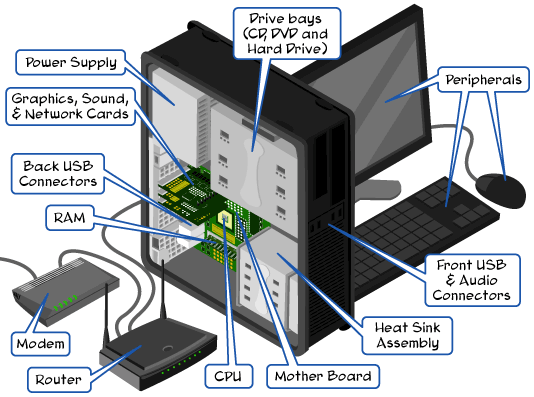
Housing: It Shelf. Is the main computer unit,
which houses all the major components?
Processor: the base or "brain" of the
computer, to process data and any mathematical operations. Now mainly used Processor
Company Intel and AMD. From each other are distinguished two main parameters:
the model and clock speed.
The
Motherboard: is a
piece chassis. To it are connected all the main elements: a processor with
cooler, hard drive, video card, memory.
The Cooler: is needed to cool the
highly basking processor. Now coolers are: an aluminum or copper base, combined
(based on copper plates with aluminum) and heat pipes.
Video Card: transmits images to a
monitor and does share calculations concerning the preparation of images for
display on a monitor. It has a built-in memory and is equipped with its own
processor cooler. The image quality depends on the video card.
A very important element of a Computer
Memory. It is different, and the
processor speed when reading data from the memory not wait. Thus, the speed of
your computer depends on the speed and amount of RAM.
HDD
(Hard Disk Drive): is
used to record and store information on it about the operating system used by
the program, recorded games, music, movies, photos, etc. differ HDD's capacity
(volume of information can fit on them), speed and types of connection to the
motherboard (SATA, IDE, USB).
The
Power Supply: is used
to supply power to all components of computer system unit. Power supplies vary
power: the power of them, the more items the "stuffing" of the
computer can be connected.
Consider secondary or auxiliary
components of the computer.
Monitor
or LCD: (display) a
device for displaying graphics and video. Most popular - CRT and LCD monitors.
CRT monitors for cathode-ray tubes are now obsolete. Liquid crystal displays
(LCD) everywhere they are replaced. Choosing an LCD monitor depends on the
purpose of use of the computer (for games, video editing, office applications,
graphics, photo processing). LCD monitors have different technical features and
parameters.
Keyboard
and Mouse: input
device for controlling a computer via special keys and buttons.
Speaker
System: speakers,
responsible for sound output information. Eton, in fact, is the most common
basic set of computer.
Wednesday, 28 November 2012

If you mean that you are an avid
player of computer games, Melody and movie fan, and while that is free of
entertainment, are very reluctant to start to go to work / school, entrusting
to perform most of the workers and the training tasks your computer, you will
need for this purpose processor high performance and excellent sound and
graphics subsystem.
So, the first thing you should
consider is the processor. To save on the clock frequency is not reasonable,
because it is known that the effectiveness of simultaneous work with multiple
complex applications limited by the value of the processor. Consequently, for
such a "digital home", which is, in fact, such a scenario is a
computer, the most optimal processor with frequency 2,5 Hz, ensuring better
performance.

Choosing a motherboard also need by
starting from the target destination computer. Moreover, note that the use of a
universal home PC, working with text, graphics, and modern games, motherboards
with integrated video - not the best solution.
Internal memory of this computer
should not be limited by the value of 1024Mb, it would be better if its volume
will be around 2 GB (2048 Mb). With an overall computer performance will only
increase.
Choose the video card in the present
case should be based on how active you intend to operate a PC as a gaming
station. For the purpose of the game is desirable to choose a more powerful
video card, but for movies and the card can be satisfied "simple."
Although, if you have more ambitious plans for a computer game, it is possible
that advice is not to limit yourself. After all, there is no limit to
perfection, as they say.
On the hard disk, you can say that for
the "digital home" to choose its size, following the expression:
"the more, the better." Since the multi-purpose use of a computer
results in a large variety of multimedia applications on it, then one day drive
with a 160-250Gb you will just not be enough for quite a hearty rich-content
storage computer (music, movies, games). It is desirable, therefore, to have
the hard drive volume to 500-750 GB, or even more - here the expression
"too far" is not applicable.
If in the case of a standard home or
office computer is desired DVD burner, but is not necessary, you do not have to
equip the "digital home" drive-reading / writing just drives DVD, can
mean a deliberate limited use of the computer. You simply do deprive yourself a
nice way to view and record movies in DVD-format - agree that this is not rosy
prospect. Therefore, to save on buying a DVD-RW drive in this case is not
recommended to the same and the price is quite affordable.
It is clear that the configuration of
the computer (including housing, cooler, keyboard and mouse) will differ from
the cost of standard office computer configuration described above. For how
much - will depend on your personal goals and preferences.
Tuesday, 27 November 2012

Choosing a
computer for a child, considering all the nuances. Computers for children of
different ages (from 1 to 7 years, 8 years and older), and their performance
characteristics.
Purchase a
variety of nuances define child computer. The age of the child the main one.
There are toy versions of laptops that are suitable for children from 1 to 3 years;
others are adapted to the age of 5-7 years. Older children should watch cheap
laptop with decent features, so you do not have to worry if he is, suddenly,
would suffer any damage.
Top choices in laptops for children
from 1 year to 7 years
For this
category of age of the children are the best children's toy laptop computers.
To familiarize younger children with a laptop are good. At which they will be
able to play in many online games, puzzles, etc. A variety of models of
children's toy laptop runs in warm colors, and their design the use of children
- such as computer models are made of durable materials.

Computers for children aged 8 and
over.
If you are
going to choose a computer for the older child, then surely there is a dilemma:
what to buy - desktop or laptop? The biggest advantage of desktop computer to a
laptop - its price. For the same configuration, the desktop computer is smaller
than a laptop. However, a lot of portable laptop than a desktop computer, so
the best would be to buy a portable computer. Now there are many affordable
low-cost laptop models, and you can buy them, or else buy a laptop "with
hands". It is also cheaper.
Wednesday, 14 November 2012

Sacred House Building History
Since the lifting of Ibrahim and Ismail Peace Be Upon them the
rules of this House the great and the hearts of people eager Eleihu and loving
and careful service, maintenance and care of his sanctity, and after a source
Prophet peace be upon him, and purify it to this house from defilements
polytheism, and deposits pagan since those Radiance blessed and flight lasted
auspicious to this day, The successors of Islam and princes mean this great
house whatever care and caring for the child care completed, May ALLAH and
service immunity and is meant for the best of rewards and complete reward.
Here are brief
summary of some of the phases of reconstruction, and phases of the Kaaba and
the Grand Mosque in general.
1 - The
pre-Islamic era:
It
was the presence of the Prophet peace be upon him and before driven by, where
hit Kaaba fire crack their structure and Ohn stones, Vartaat Quraish to that
order and take care of him, but no one dared them to make something at home in
tribute to him and fear of a curse or the side down with them.
Vtgero Alwaleed
bin invasive on that matter, and submit to the Kaaba Vaqtal first stone of
which he says: God does not canals do not want nothing but good, followed him
people then and participated in the structure of the Kaaba, participated
Prophet peace be upon him in the building at the time, complete it built at an
altitude of eighteen cubits and expanded stone and lifted its door to Adkhalo
they want and prevent than they want, and Sagvoha was in the time of Abraham is
roofed and made her Mizaba to drain rain.
2 - In the days
of Omar bin Khattab, may ALLAH be pleased with Him:
Raid
Kaaba avalanche knew upsell or Nhishl a woman shelf that stream and uprooted
Torrent Maqam Ibrahim and Garfa down Mecca, and when he arrived the news to the
faithful Omar, a city, presented himself to stand on this event, and that was
in seventeen of migration, individual Omar place to place, then began his
reform and expansion of the mosque he bought some adjacent role, and then the
mosque wall wall has a height without stature and make him a back door in the
alignment of the tracks and taken to the mosque lamps and make it over its
wall.
3 - In the era
of Uthman:
Bought
role next to the mosque, then he enlarged and made him a gallery roofed the
first gallery I keep Muslims.
4 - In the era
of Ibn-al-Zubayr:
In
the strife between Ibn-al-Zubayr and Umayyad thrown Kaaba catapult and burned
and cracked walls, and ordered Ibn-al-Zubair demolished then built on the rules
of Abraham
When the Crown
Hajjaj bin Yusuf the Mecca Althagafi by Abdul Malik bin Marwan sought
permission pilgrims in demolition and restored to what it was he did.

Provisions of the Preferred Sacrifice
Defined:
Is the name of
the slaughtered animal livestock (Camels, Cattle and Sheep) on the day of
sacrifice after the Eid Prayer to the last days of al (the third ten days of
Dhul-Hijjah) closer to the Almighty God sacrificial structure.
Legitimacy:
God Said:
(separated for the Lord and sacrifice) (Kaosar الكوثر) and the Almighty Said: (and every nation We منسكا to mention the
name of God is living from cattle etc....) (Hajj الحج 34). God Says: (Say that my prayer and my sacrifice and my dying
to God, not a partner and so I ordered the first Muslims) (cattle الأنعام :162-163), saying (ونسكي) Anginal.
And narrated by
Bukhari and Muslim that the Prophet, Peace Be Upon Him Sacrificed two Omlhan
Oqrnin, ذبحهما his hand and called and size.
Verdict:
The majority of
scholars that it is a confirmed Sunnah. Bukhaari said in his Saheeh in the Book
of sacrificial animals: Bab years Sacrifices said Hafiz Ibn Hajar in the
commentary like translated Year reference to violation of said obligatory, said
Hafiz also, Ibn Averred: not valid for one of the companions that it is
obligatory Saheeh it is due to the majority, There is no dispute in the fact
that the canons of religion, a public when Shaafa'is and uncertain year, and
Abu Hanifa: answer the resident and the solvent.
Al-Tirmidhi that
a man asked Ibn 'Umar (May Allah be pleased with Him) for the sacrifice it due?
He said: sacrificed Messenger of Allah peace be upon him and Muslims after him,
and Tirmidhi Said: work on this the scholars is that the sacrifice is not
obligatory,
Shaykh Ibn
'Uthaymeen, after mentioning the evidence of those who say it is obligatory and
those who say Badmh: and evidence are almost equal, and behavior as a backup
that does not leave us with the ability to maximize the God and said clearance
certainty.
Wisdom:
Allaah has
prescribed sacrifice for the rule and the many benefits involved in each with a
sacrificial animal slaughter Haj enjoying or compare,
Of this rule:
1. Mentioning
God and unification, where must sacrifice to mention God to sacrifice when
slaughtered as he says (to witness the benefits to them and mention the name of
God in the days of information on what the livelihood of Cattle etc...) (Hajj الحج: 28), and saying (say my prayer and my sacrifice and my dying to
God is not a partner and so I ordered the first of the Muslims) (الأنعام: 162).
2. Thank God
Almighty we remember His grace that we create these cattle and solve it for us,
as he says: (well Skharenaha you, that ye may give thanks) (Hajj الحج: 36).
3. Expansion on
the people, especially the poor and needy in these blessed days, as stated in
the Hadeeth: "Are days of eating, drinking and God", Vichark the poor
and needy rich and able to eat meat in these blessed days. Almighty God says:
(so eat them and feed the miserable and the poor) (Hajj الحج: 28), and God says (so eat them fed Aleghana and Almaatar) (Hajj الحج: 36).
4. To
commemorate Prophet Abraham and his son Ishmael, where ransoms God Ismail from
the slaughter of the ram great, and in this story of the lessons a lot, including
obedience to God no matter what that cost us do, and thanks to God Almighty for
this redemption and mitigation Nabih Ibrahim and his son Ishmael and the
Islamic Ummah to do time.
And then:
Time of
slaughtering the sacrifice of Eid al-Adha Prayers to last the Tashreeq the
third ten days of Dhul-Hijjah.
Conditions:
First: to reach
the required age, and acceptable from his lamb-a-half years, and his goats
years, and cow him two years, and camels him five years, without distinction
between the male and female
Second: safety
defects, not may sacrifice Palmaabh such:
1. Diseased
Albin her illness.
2. Caecum Albin
Aouraa.
3. Awkward Albin
Arjha.
4. Lean not Purified: Her brain went from severe wasting.
There are other
disadvantages of various parts and whether like Alasaba (broken horn and ear)
and Alehtme (which went folds of origin), and Alasme (break the cover of her
century) and blind and Altola (which revolve in the pasture and graze). Scabby
and many try it and other defects not mentioned in the hadeeth quoted above it,
although it counts but hates sacrifice, God is Good and does not accept
anything but good, and maximizes the symbols of Allah but paradise.

Recipe Visit the Mosque of the Prophet (PBUH)
* Isn you to go into
the city at any time structure visit the Prophet's (PBUH) Mosque and Praying
there; because Prayer
It is better
than a thousand Prayers elsewhere except in the Sacred Mosque; because the
Prophet, Peace Be Upon Him.
* Not to visit
the Prophet's (PBUH) Mosque Ihraam not meet, nor a link between them and the
pilgrimage at all.
* If you reach
the Prophet's (PBUH) Mosque introduced your right leg when he entered marking
God arrived on Nabih peace be upon him, and ask God to open your doors mercy
and say: "I seek refuge in God Almighty, face cream and authority old from
the accursed Satan, O Open to me the gates mercy", As prescribed when
entering other mosques.
* Initiated
after you have entered the Prayer of greeting the mosque, even though in
kindergarten is good, but in any place in the mosque.
* Then go to the
tomb of the Prophet Peace Be Upon Him, stopping him in the future for him, and
then say politely low voice: Peace be upon you, O Prophet (PBUH) and the mercy
and blessings of God, arrived upon, although I said: O Ath means and virtue,
and ابعثه primarily commendable promised. Oh Adzh penalty for a better nation,
there is nothing wrong.
Then turn
slightly to your right to stand in front of the tomb of Abu Bakr, may Allah be
pleased with him be delivered him and invites him for forgiveness and mercy.
Then turn a
little back to your right to stand in front of the tomb of Omar may Allah be
pleased with him to be delivered him and calls him.
* Isn you to go
purified to Quba Mosque, Wiczorh and Pray there; did the Prophet, Peace Be Upon
Him and encourage him in it.
* It is Sunnah
to you to visit the graves of the people of Baqi and the tomb of Osman may
Allah be pleased with him and one of the martyrs and the tomb of Hamza, God
bless them, delivered them, and calls them; because the Prophet Peace Be Upon Him
was visited and calls them, and taught his companions if they visited the
graves to say: (Hello people Diar believers and Muslims, and I God willing you
to Successors, and we ask God to you wellness) Narrated by Muslim.
* And not the
city's mosques and places initiate had not mentioned, do not be harsh on
yourself and take what you do not pay, but maybe your right where the burden of
God is the source of strength.

The Important Advice for Pilgrims (للحاج)
1. Accompanied
righteous and science and take advantage of them.
2. Back
patience, bearing harm your neighbors, do not harmed anyone of your brothers
and pay in the best manner.
3. Stay away
from lying, cheating, stealing, backbiting and gossip and ridicule.
4. Be tolerant
to sell you and your purchase and your business so God bless you.
5. Beware of
touching women, or to consider them, and Hide men نساءك.
6. Beware
smoking is haram for him: (and replace them with good things and deprives them
of all evils) (الأعراف: 157).
7. Beard
Accessories for men beware her throat for saying peace be upon him: (but I
ordered me to my Lord Almighty that relieved to حيني and tell drinkers).
8. "Remove
the gold rings has forbade peace be upon him gold rings and saying peace be
upon him: [baptizes peace and blessings of fire into making in his hand?"
Narrated by Muslim. "And replace it with silver," the Prophet peace
be upon him took a ring of silver "
9. More than
reading the Koran and ponder and act upon it, and the male and pray.
10. Do not leave
for the Promotion of Virtue and Prevention of Vice, but with wisdom and good
counsel with kindness and gentleness and kindness.
11. If you see
that the debate is useful leave it if you're right for saying peace be upon
him: I am the leader of a house in ربض paradise for those who leave the controversy,
although he was right] Narrated by Abu Dawood.
12. Saleh
opponents, and UV Dink, and recommended your family are not extravagant
decorations, cars, candy, and carcass and others, says: (and eat and drink but
waste not by excess). (الأعراف: 31).
13. Hurry Pfarbp
pilgrimage When you have money enough back and forth, does not matter for
expenses after Hajj such as gifts and candy, etc., where Allah does not accept
the excuse, hasten to the pilgrimage before you get sick, or lacking, or die a
sinner, because Hajj pillars of Islam, has benefits great in this world and the
hereafter.
14. And it is
very important to overcome to solve your problems using God alone and
supplication alone, says: (Say but claimed Lord should not share with anyone).
(Jinn الجن: 25).
15. Forbidden
for a woman to travel to the Hajj and other except with a Mahram for saying
peace be upon him: [A woman should not travel, unless her Mahram.
"Agreed."
16. No woman
Taakhi foreign man become taboo claiming her.
Subscribe to:
Posts (Atom)


